
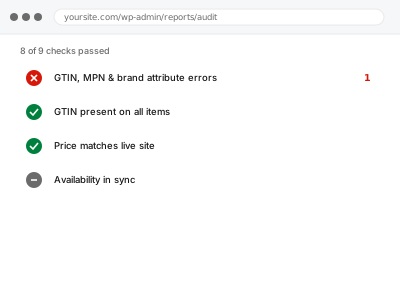
Google increasingly requires a GTIN (the barcode number) for products in categories where one should exist, and will reject or limit visibility for products missing one, using the wrong one, or pairing a GTIN with a brand name that doesn’t match what Google’s own product database has on file for that code.
Check whether your GTIN actually resolves to your product elsewhere
Search the GTIN (the number under your product’s barcode, often 12 or 13 digits) on a barcode lookup site or Google Shopping itself. If it resolves to a different product entirely, or to nothing, that mismatch is very likely what’s triggering the rejection, rather than a formatting issue.
GTIN, MPN & brand attribute errors
A GTIN, MPN, or brand mismatch found and fixed, with genuine exemptions applied where they're due.
- Full backup taken before we start
- If we can’t fix it, you get your money back
- We never ask for your own password
This or something else?
| Products are flagged for missing, invalid, or mismatched GTIN, MPN, or brand | This fix covers it |
| The rejection reason is a general data spec issue, not specifically these attributes | Product data spec violation remediation, the broader version |
| You genuinely don’t have GTINs for custom or handmade products | This fix covers it; Google does allow marking products as GTIN-exempt in eligible cases |
| The issue is about price, not these identifying attributes | Structured data vs feed price mismatch, or the automatic pricing fix |
What you are seeing
- Products disapproved specifically citing GTIN, MPN, or brand issues
- A GTIN present but not matching Google’s own records for that code
- Products in a category where GTIN is required, but none is provided
- Brand name inconsistent between your feed, your site, and what Google expects
Common causes
- A GTIN copied incorrectly, transposed digits, or from the wrong product variant
- Custom or private-label products genuinely having no manufacturer GTIN
- Brand name formatted differently across your feed and your actual product pages
- A GTIN belonging to a different product entirely, from a data entry error
- Google’s category requirements changing to require GTIN where it previously didn’t
What we do
- Identify every product flagged for GTIN, MPN, or brand issues
- Verify correct GTINs where they exist, correcting any transcription errors
- Apply the GTIN-exempt flag correctly for genuinely exempt custom or private-label products
- Align brand naming consistently across feed and site
- Resubmit corrected data and monitor for approval
- Check remaining catalogue for the same pattern of errors
What is included
- GTIN, MPN, and brand data corrected for flagged products
- Appropriate GTIN-exemption applied where genuinely applicable
- A catalogue-wide check for the same error pattern
- A written note on what was corrected
Not included
- Obtaining a GTIN for a product that genuinely needs one and doesn’t have one — that’s arranged through the manufacturer or a GS1 registration
- Guaranteeing approval, Google’s own decision
- Ongoing monitoring as new products are added without correct identifiers
- Resolving an unrelated feed structure or pricing issue
Questions about this fix
What if my product genuinely doesn't have a GTIN?
For genuinely custom, handmade, or private-label products in eligible categories, Google allows a GTIN-exempt designation instead of requiring one that doesn't exist — we check whether your products qualify.
How would a GTIN be wrong if I copied it correctly?
It happens more than you'd expect — a transposed digit, a GTIN meant for a different variant of the same product, or one that's simply outdated in a manufacturer's own records can all cause a mismatch.
Does brand name really need to match exactly everywhere?
Close enough that Google's matching recognises it as the same brand — inconsistent capitalisation or an abbreviated version in one place versus the full name elsewhere can sometimes trigger a flag.
Can I get a GTIN myself if I need one?
Yes, through GS1, the organisation that issues them — it's a legitimate process if your product category genuinely requires one and you don't already have one from a manufacturer.
Will this affect my products' visibility even before full disapproval?
Yes, potentially — Google can limit visibility for products with data-quality concerns even short of an outright rejection, which is part of why this is worth fixing even for products that technically still show.
Related fixes
If this is the second time this year
A bad update breaking the site is a symptom of updates not being tested first. Care plans run every update on a staging clone before it reaches your live site, which is the actual fix for this happening again.
Your access, your rules
Create a separate admin account for us and delete it when we are done. For anything else, we get in touch and agree a method — never a form field on this site, never by reply to an email.
We back up first, always
Before anything is touched we take a full backup and keep it for 30 days. If a fix goes wrong, we put the site back exactly as it was.
If it is not what you bought
If the problem turns out smaller than what you ordered, we refund the difference. If it is bigger, we stop and send a quote before doing any extra work.
If we cannot fix it
You get back what we received. Diagnosis is on us — you only pay when the problem is actually solved. The payment processor takes its fee before the money reaches us, so we never hold it and it is not ours to return. That is true here as everywhere else.
If it comes back
Reply within seven days of delivery and we put it back on the bench at no cost. The fix is not finished until it holds.
What we are responsible for
If something goes wrong with a fix, our responsibility is limited to what you paid for it. We take a full backup first so mistakes can be undone, and we tell you before doing anything outside what you bought.