
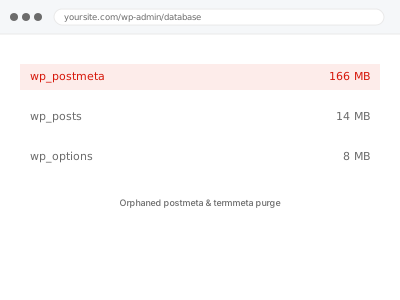
Every post carries metadata in a separate table — custom fields, SEO data, builder settings — linked by post ID. When a post is deleted, that link is supposed to clean up automatically, and often doesn’t; the postmeta and termmeta rows survive the post or term they belonged to, referencing IDs that no longer exist anywhere.
Why there’s nothing to check yourself here
Orphaned postmeta and termmeta don’t show up in any WordPress screen; they’re rows referencing a post or term ID that’s already gone, which only a direct database query can identify.
Unlike database size generally, this specific kind of bloat has no visible symptom beyond an unexplained gap between your content count and your table sizes, which is genuinely not something to chase down without direct access.
If you’ve recently done a bulk deletion, an import cleanup, or a migration, mentioning that when you order is more useful than trying to inspect the tables yourself, since it points us straight at the likely window this happened in rather than requiring us to scan the entire history of the database blind.
It’s also worth accepting upfront that we may not be able to point to a single, satisfying explanation once we’re done — sometimes the honest finding is a combination of small contributing causes over a long period, rather than one clean event to name.
Orphaned postmeta & termmeta purge
Deleted posts and terms have left orphaned metadata behind, referencing IDs that no longer exist. We identify and remove it, and find what's causing the ongoing habit.
- Full backup taken before we start
- If we can’t fix it, you get your money back
- We never ask for your own password
This or something else?
| Postmeta or termmeta tables disproportionately large relative to actual content count | This fix covers it |
| General database size concern without a specific table identified | Database size audit & reduction report |
| Post revisions, drafts, or transients specifically | Database cleanup – revisions, autodrafts, transients |
| Table overhead or fragmentation, not orphaned rows specifically | Database table optimization & defragmentation |
| Site slow with no database symptom identified | Slow site diagnostic report |
What you are seeing
- Postmeta or termmeta tables much larger than your post and term count would explain
- A database size audit specifically flagging orphaned metadata as a contributor
- No visible front-end or admin symptom, since this doesn’t affect what displays anywhere
- The gap between content count and table size widening after bulk deletions
- Slower queries on anything joining against these tables, even for unrelated content
Common causes
- Posts or terms deleted directly via a bulk database operation that skipped WordPress’s own cleanup hooks
- A plugin’s uninstall process removing its features but leaving its metadata behind
- Content imported and later deleted in bulk without triggering the usual meta cleanup
- A migration or restore that recreated posts with new IDs, orphaning metadata tied to the old ones
- Custom code or a script that deleted posts directly at the database level
What we do
- Identify postmeta and termmeta rows referencing post or term IDs that no longer exist
- Cross-check against current content to confirm what’s genuinely orphaned versus simply unusual
- Remove confirmed orphaned metadata
- Check whether a specific plugin or process is the ongoing source, not just a one-time event
- Address that source if one is found, so this doesn’t silently reaccumulate
- Re-measure table sizes to confirm a real, measured reduction
What is included
- Orphaned postmeta and termmeta identified and removed
- Cross-checking against current content to avoid removing anything genuinely in use
- The likely source identified where one dominates
- The pre-cleanup backup, kept for 30 days
Not included
- General database cleanup beyond postmeta and termmeta specifically
- Fixing a plugin’s own uninstall process, beyond identifying it as the cause
- Recovering content that was genuinely deleted, orphaned meta included
- Ongoing monitoring of table growth
Questions about this fix
How would I know this is even a problem if it's invisible?
You likely wouldn't, on your own — this is usually found as part of a broader database size audit rather than something a site owner notices directly, which is exactly why there's no self-check for it above.
Could this be slowing down admin screens that have nothing to do with the deleted content?
Yes — these tables get joined against in all sorts of unrelated queries, so bloat here can add a small drag even to screens with no direct connection to whatever was originally deleted.
Could this be caused by something I did deliberately, like a bulk delete?
Yes, particularly a bulk delete performed outside WordPress's normal interface, which skips the cleanup hooks that would otherwise remove associated metadata automatically.
Will removing this affect any of my actual content?
No — by definition, orphaned metadata references content that no longer exists, so removing it has no effect on anything currently live on your site.
Does every WordPress site accumulate this over time?
To some degree, yes, though the amount varies hugely depending on how content has been deleted over the site's life — a site that's only ever used the standard admin interface accumulates far less than one that's had bulk operations or imports and deletions.
Related fixes
If this is the second time this year
A bad update breaking the site is a symptom of updates not being tested first. Care plans run every update on a staging clone before it reaches your live site, which is the actual fix for this happening again.
Your access, your rules
Create a separate admin account for us and delete it when we are done. For anything else, we get in touch and agree a method — never a form field on this site, never by reply to an email.
We back up first, always
Before anything is touched we take a full backup and keep it for 30 days. If a fix goes wrong, we put the site back exactly as it was.
If it is not what you bought
If the problem turns out smaller than what you ordered, we refund the difference. If it is bigger, we stop and send a quote before doing any extra work.
If we cannot fix it
You get back what we received. Diagnosis is on us — you only pay when the problem is actually solved. The payment processor takes its fee before the money reaches us, so we never hold it and it is not ours to return. That is true here as everywhere else.
If it comes back
Reply within seven days of delivery and we put it back on the bench at no cost. The fix is not finished until it holds.
What we are responsible for
If something goes wrong with a fix, our responsibility is limited to what you paid for it. We take a full backup first so mistakes can be undone, and we tell you before doing anything outside what you bought.