
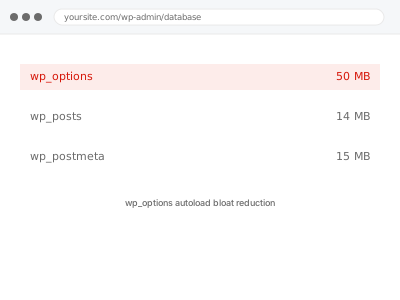
Every page load, WordPress fetches every row in wp_options marked to “autoload” in a single query, before it does almost anything else — settings, plugin configuration, cached data. When that autoloaded set grows into megabytes instead of the few hundred kilobytes it should be, every single page load pays that cost upfront, whether the page actually needs that data or not.
Before you buy, one quick look
Read-only. Recent WordPress versions (6.6 and later) show an “Autoloaded options” figure directly under Tools → Site Health → Info → Database, with a warning if it’s unusually large.
If your WordPress installation predates that, this specific number isn’t visible without a plugin like Query Monitor, which is a large part of why this problem often goes unnoticed until something else prompts a closer look.
A figure in the low hundreds of kilobytes is normal; several megabytes is a strong signal; tens of megabytes means every page load is paying a real, measurable cost before rendering a single thing a visitor can actually see. It’s worth checking this even on a site that otherwise feels reasonably fast, since the cost is uniform across every page rather than concentrated somewhere obvious enough to notice on its own.
wp_options autoload bloat reduction
WordPress loads your entire wp_options autoload set on every single page. We find what's bloating it, correct what shouldn't load eagerly, and measure the reduction.
- Full backup taken before we start
- If we can’t fix it, you get your money back
- We never ask for your own password
This or something else?
| Autoloaded options size shown as unusually large in Site Health | This fix covers it |
| General database size large across many tables, not specifically wp_options | Database cleanup – revisions, autodrafts, transients |
| The size keeps growing continuously rather than sitting at one stable number | Autoloaded transient runaway growth fix |
| Query performance slow generally, cause unclear | Database query performance audit |
| Site slow with no specific database symptom identified | Slow site diagnostic report |
What you are seeing
- Site Health flagging autoloaded options size as large, on WordPress 6.6 or later
- General site slowness with no other obvious front-end cause
- Every page, including simple ones, loading slower than the content would suggest
- The problem present sitewide rather than on specific pages
- No recent plugin change to explain it, since this often builds up gradually over years
Common causes
- A plugin storing large amounts of data in options and marking it to autoload unnecessarily
- Old plugins, since deactivated or removed, that left autoloaded data behind
- Page builder or theme data cached into options rather than a dedicated table
- Serialized arrays growing over time as more content or settings are added
- Multiple plugins each contributing a moderate amount, adding up to a large total
What we do
- Identify exactly which options are marked to autoload and how large each one is
- Determine which are genuinely needed on every page load and which aren’t
- Correct the autoload flag on data that doesn’t need to load on every request
- Remove autoloaded data left behind by deactivated or removed plugins
- Confirm no active feature depends on the data staying autoloaded
- Re-measure the total autoloaded size to confirm a real reduction
What is included
- Autoloaded options identified and measured individually
- Autoload flags corrected for data that doesn’t need loading on every page
- Leftover data from removed plugins cleared
- The pre-fix backup, kept for 30 days
Not included
- Removing options actively used by a plugin you still run
- General database cleanup beyond the wp_options table specifically
- Ongoing monitoring as new plugins are installed
- Fixing a plugin’s own poor coding practice, only working around its effect
Questions about this fix
Is this the same as clearing transients?
Related but different — some transients are marked to autoload and contribute to this problem, but autoloaded bloat also includes plugin settings and cached data that isn't a transient at all. This addresses the whole autoloaded set, not just transients.
Will correcting the autoload flag break a plugin?
Not if done correctly — the data itself isn't touched, only whether it's fetched on every page load versus only when actually needed. We confirm nothing depends on the eager loading before changing it.
How did this get so large without anyone noticing?
Because it's invisible in normal WordPress use — there's no admin screen showing autoload size on older WordPress versions, so it accumulates silently until either it's checked directly or the slowdown becomes noticeable enough to investigate.
Can one plugin really cause megabytes of bloat?
Yes, particularly plugins that cache API responses or large datasets into options rather than a proper table — it's a known anti-pattern, and we can usually identify the specific plugin responsible by size alone.
Will this need doing again later?
Less likely if the cause was a plugin that's since been fixed or removed. If a currently active plugin is still adding to autoloaded data, we'll flag it so you know it's an ongoing habit worth watching rather than a one-time event.
Related fixes
If this is the second time this year
A bad update breaking the site is a symptom of updates not being tested first. Care plans run every update on a staging clone before it reaches your live site, which is the actual fix for this happening again.
Your access, your rules
Create a separate admin account for us and delete it when we are done. For anything else, we get in touch and agree a method — never a form field on this site, never by reply to an email.
We back up first, always
Before anything is touched we take a full backup and keep it for 30 days. If a fix goes wrong, we put the site back exactly as it was.
If it is not what you bought
If the problem turns out smaller than what you ordered, we refund the difference. If it is bigger, we stop and send a quote before doing any extra work.
If we cannot fix it
You get back what we received. Diagnosis is on us — you only pay when the problem is actually solved. The payment processor takes its fee before the money reaches us, so we never hold it and it is not ours to return. That is true here as everywhere else.
If it comes back
Reply within seven days of delivery and we put it back on the bench at no cost. The fix is not finished until it holds.
What we are responsible for
If something goes wrong with a fix, our responsibility is limited to what you paid for it. We take a full backup first so mistakes can be undone, and we tell you before doing anything outside what you bought.