
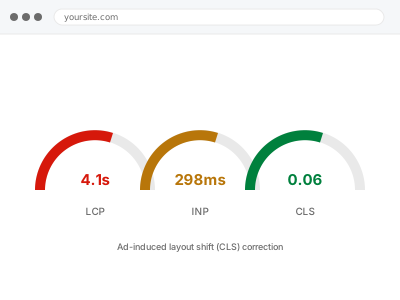
An ad unit that loads after the surrounding content has already rendered pushes everything below it down the moment it appears — annoying for visitors who click the wrong thing as a result, and directly measured by Google as Cumulative Layout Shift, a ranking factor independent of the ad revenue itself.
Watch the page load on a fresh, slow connection
Load a page with an ad unit on a throttled connection (Chrome DevTools’ Network tab has a throttling option) and watch what happens as the ad appears — content visibly jumping down when the ad loads confirms this specifically, rather than a different performance issue.
Ad-induced layout shift (CLS) correction
Ads that shift your content when they load, measured and fixed as the layout-stability problem it actually is.
- Full backup taken before we start
- If we can’t fix it, you get your money back
- We never ask for your own password
This or something else?
| Content visibly jumps or shifts when an ad loads | This fix covers it |
| Ads aren’t showing at all | AdSense code placement & ad unit implementation, a different issue |
| Site is generally slow, not specifically shifting around ads | A broader performance diagnosis |
| Ads load fine but you want them repositioned | Ad slot responsive breakpoint repair, if the issue is responsive-specific |
What you are seeing
- Content visibly jumping down when an ad unit loads
- Visitors reporting accidental clicks caused by the shift
- A poor Cumulative Layout Shift score in PageSpeed Insights or Search Console
- The shift possibly worse on certain devices or connection speeds
Common causes
- No reserved space set for the ad unit before it loads
- Responsive ad units resizing between mobile and desktop without a matching reserved container
- Auto Ads inserting units dynamically with no predictable size reserved
- Multiple ad sizes possible for one slot, with space reserved for only one of them
- Slow-loading ad scripts delaying when the unit’s actual size becomes known
What we do
- Identify every ad unit contributing to layout shift
- Reserve appropriate space for each unit before it loads, sized to its actual dimensions
- Adjust responsive containers so reserved space matches each breakpoint’s ad size
- Test on throttled connections to confirm shift is eliminated
- Re-measure Cumulative Layout Shift to confirm improvement
- Verify ad revenue and visibility aren’t negatively affected by the changes
What is included
- Layout shift from ad units measurably reduced or eliminated
- Reserved space correctly matched to actual ad dimensions across breakpoints
- Before-and-after Cumulative Layout Shift measurement
- The pre-fix backup, kept for 30 days
Not included
- Layout shift caused by something other than ads, a separate performance fix
- Redesigning ad placement itself, a separate fix if that’s actually what’s needed
- Ongoing adjustment as you add new ad formats or sizes
- Guaranteeing a specific PageSpeed score, which depends on more than this one factor
Questions about this fix
Will reserving space for ads reduce how many ads actually show?
No — this doesn't change ad serving itself, just how the page behaves visually while an ad loads, so the same ads still show, without the disruptive jump.
Does this affect my ad revenue?
It shouldn't reduce it, and can indirectly help — fewer accidental clicks from shift means more of your clicks are genuine, which platforms generally value over inflated, accidental ones.
Is this the same as a general 'site is slow' problem?
Related but distinct — layout shift is specifically about visual stability as the page loads, separate from overall load speed, though both are measured as part of Core Web Vitals.
Will this help my Google rankings?
Cumulative Layout Shift is one of several ranking-adjacent signals Google measures, so improving it can help, though it's one factor among many rather than a guaranteed ranking boost on its own.
Could Auto Ads specifically be the cause, since I don't control exact placement?
Yes, that's a common cause since Auto Ads inserts units dynamically — we can either work within Auto Ads' constraints or discuss switching to manually placed units for more predictable behaviour.
Related fixes
If this is the second time this year
A bad update breaking the site is a symptom of updates not being tested first. Care plans run every update on a staging clone before it reaches your live site, which is the actual fix for this happening again.
Your access, your rules
Create a separate admin account for us and delete it when we are done. For anything else, we get in touch and agree a method — never a form field on this site, never by reply to an email.
We back up first, always
Before anything is touched we take a full backup and keep it for 30 days. If a fix goes wrong, we put the site back exactly as it was.
If it is not what you bought
If the problem turns out smaller than what you ordered, we refund the difference. If it is bigger, we stop and send a quote before doing any extra work.
If we cannot fix it
You get back what we received. Diagnosis is on us — you only pay when the problem is actually solved. The payment processor takes its fee before the money reaches us, so we never hold it and it is not ours to return. That is true here as everywhere else.
If it comes back
Reply within seven days of delivery and we put it back on the bench at no cost. The fix is not finished until it holds.
What we are responsible for
If something goes wrong with a fix, our responsibility is limited to what you paid for it. We take a full backup first so mistakes can be undone, and we tell you before doing anything outside what you bought.