
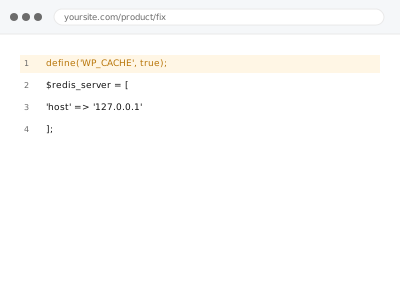
Object caching (Redis or Memcached) stores frequently accessed database query results in memory, reducing repeated database load on a busy site — a meaningful performance improvement, but only available where your hosting environment actually provides Redis or Memcached at the server level, which not every hosting plan does.
Confirm your host actually offers Redis or Memcached before ordering this
Check your hosting control panel or ask your host directly whether Redis or Memcached is available on your plan. If neither is offered, this fix isn’t achievable on your current hosting regardless of configuration effort, since object caching genuinely requires that server-level infrastructure to exist first.
Object cache setup - Redis or Memcached
Redis or Memcached object caching configured — only where your host actually provides it.
- Full backup taken before we start
- If we can’t fix it, you get your money back
- We never ask for your own password
What we need from you
- Confirmation your host offers Redis or Memcached, or access to check with them directly
- WPA and FTP access to configure the WordPress-side connection
- Confirmation of any existing page-level caching, so we can check for interaction
This or something else?
| Your host offers Redis or Memcached and you want it configured for your WordPress site | This fix covers it |
| Your host doesn’t offer either — worth confirming this first | This isn’t something we can create where the underlying server infrastructure doesn’t exist; a plan upgrade or host change would be the path forward if this matters to you |
| You want page-level caching, not object caching specifically | Server-level cache (LiteSpeed/Varnish) configuration, a different kind of caching |
| You’re experiencing a conflict between different caching layers already in place | Server cache & plugin cache conflict, the diagnostic version |
What we do
- Confirm Redis or Memcached availability on your hosting
- Configure the appropriate WordPress-side plugin or code to use the available object cache
- Verify database queries are actually being cached as expected
- Test site function to confirm no compatibility issues introduced
- Measure and document the performance improvement
- Check for interaction with any existing page-level caching
What is included
- Object caching configured to work with your available Redis or Memcached service
- Verified actual caching behaviour, not just installed configuration
- Measured performance improvement, documented
- A check for interaction with existing page-level caching
Not included
- Providing Redis or Memcached where your hosting plan doesn’t offer it — that’s a hosting infrastructure limitation, not something we can configure around
- Upgrading your hosting plan to access this feature, your decision with your host directly
- Page-level caching configuration, a separate, related fix
- Ongoing tuning as your site’s query patterns change significantly
Questions about this fix
What if my host doesn't offer Redis or Memcached at all?
That's a genuine infrastructure limitation — object caching specifically requires this server-level service to exist, and no WordPress-side configuration can create it where the underlying hosting doesn't provide it; upgrading your plan or switching hosts would be the realistic path if this matters to you.
How is this different from a page caching plugin?
Page caching stores entire rendered pages; object caching specifically stores individual database query results, which helps most with dynamic content that can't be fully page-cached (like a logged-in user's personalised view) — the two are complementary, not competing approaches.
Will I definitely notice a performance improvement?
The improvement is generally most noticeable on sites with significant dynamic content or database load — a mostly static site with effective page caching already in place might see a more modest additional benefit, which we'd measure and report honestly for your specific case.
Is Redis or Memcached better for my site?
Both serve a similar purpose with some technical differences — the better choice often comes down to what your specific hosting environment actually provides, since you can't necessarily choose freely between them if your host only offers one.
Could this cause any compatibility issues with my current plugins?
It's possible with a plugin doing something unusual with data that doesn't cache well — we test after configuration specifically to catch this before considering the fix complete.
Related fixes
If this is the second time this year
A bad update breaking the site is a symptom of updates not being tested first. Care plans run every update on a staging clone before it reaches your live site, which is the actual fix for this happening again.
Your access, your rules
Create a separate admin account for us and delete it when we are done. For anything else, we get in touch and agree a method — never a form field on this site, never by reply to an email.
We back up first, always
Before anything is touched we take a full backup and keep it for 30 days. If a fix goes wrong, we put the site back exactly as it was.
If it is not what you bought
If the problem turns out smaller than what you ordered, we refund the difference. If it is bigger, we stop and send a quote before doing any extra work.
If we cannot fix it
You get back what we received. Diagnosis is on us — you only pay when the problem is actually solved. The payment processor takes its fee before the money reaches us, so we never hold it and it is not ours to return. That is true here as everywhere else.
If it comes back
Reply within seven days of delivery and we put it back on the bench at no cost. The fix is not finished until it holds.
What we are responsible for
If something goes wrong with a fix, our responsibility is limited to what you paid for it. We take a full backup first so mistakes can be undone, and we tell you before doing anything outside what you bought.