
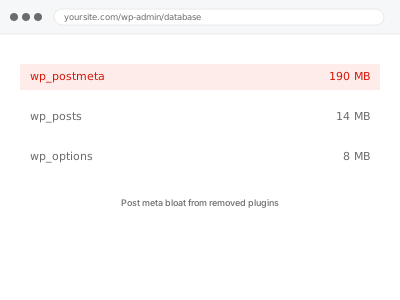
Uninstalling a plugin removes its files, and depending on how well it was built, sometimes removes its settings — but it’s a common shortcut for a plugin to leave its postmeta entries in place on every post it ever touched, on the assumption that cleaning up thousands of individual meta rows isn’t worth its own trouble. That assumption becomes your database’s problem, not the plugin author’s.
Why this is hard to spot yourself
Postmeta from a removed plugin doesn’t announce itself anywhere; the plugin is gone, but its meta keys remain silently attached to your posts, invisible unless you’re specifically querying for them.
The only real clue from inside WordPress is a database that feels larger than your content justifies, with no obvious cause in what’s currently installed.
If you can recall roughly which plugins you’ve removed over the site’s history, even a rough list, that’s more useful to us than trying to inspect the database yourself, since it narrows exactly what we’re looking for from the start.
Post meta bloat from removed plugins
Plugins removed long ago left their post meta behind on every post they ever touched. We trace it back and clear what's no longer needed.
- Full backup taken before we start
- If we can’t fix it, you get your money back
- We never ask for your own password
This or something else?
| Database size disproportionate to content, with no currently-active plugin explaining it | This fix covers it |
| You can name a specific plugin removed a while ago that likely left data behind | This fix covers it, more precisely |
| General database cleanup covering revisions, transients and drafts too | Database cleanup – revisions, autodrafts, transients |
| Orphaned metadata unrelated to a specific removed plugin | Orphaned postmeta & termmeta purge |
| Site slow with no specific database symptom | Slow site diagnostic report |
What you are seeing
- Database size that feels disproportionate to your actual content and current plugin list
- A specific memory of having removed one or more plugins at some point in the site’s history
- Postmeta table size much larger than your post count alone would explain
- No currently-active plugin obviously accounting for the volume
- Slower queries on content that touches postmeta broadly, even unrelated to any current feature
Common causes
- A plugin’s uninstall routine only removing its own options, not its per-post meta entries
- A plugin removed by deactivating and deleting without ever running its proper uninstall process
- Meta keys left behind referencing a plugin’s own custom fields on every post it once processed
- Several plugins removed over the site’s history, each leaving a smaller amount that adds up
- A plugin swap — replacing one tool with a similar one — leaving the old tool’s data alongside the new one’s
What we do
- Identify meta keys present that don’t correspond to any currently active plugin or theme
- Confirm which removed plugin each set of orphaned meta likely belonged to
- Verify nothing currently active depends on that legacy data before removing it
- Remove confirmed orphaned meta tied to plugins no longer in use
- Check whether a currently active plugin is a like-for-like replacement still needing the old data mapped across
- Re-measure postmeta table size to confirm a real, measured reduction
What is included
- Orphaned meta from previously removed plugins identified and cleared
- Confirmation that nothing currently active depends on the removed data
- A note on which removed plugins were responsible, where identifiable
- The pre-cleanup backup, kept for 30 days
Not included
- Migrating old plugin data into a new, replacement plugin’s format
- General database cleanup beyond meta left by removed plugins specifically
- Reinstalling or restoring a plugin you no longer want
- Ongoing monitoring as plugins are added or removed in future
Questions about this fix
How do you know which plugin a piece of orphaned meta came from if it's already gone?
Meta keys are usually prefixed or named in a way that hints at their origin, and cross-referencing against documentation or the plugin's public code, where available, often confirms it even after removal.
Could this data still be useful if I reinstall the plugin later?
Sometimes, which is why we confirm you're not planning to reinstall before removing anything — if you might, we'd rather flag that than assume the data is safe to clear.
Why doesn't uninstalling a plugin clean this up automatically?
It depends entirely on how the plugin was built — a well-built uninstall routine does remove its own meta, but many simply don't bother, since it's extra development effort for something the plugin's own author will never see the cost of.
Is this the same as the general orphaned postmeta fix?
Related — both target unnecessary postmeta — but this specifically traces data to plugins you've removed, while the general fix targets meta orphaned by deleted posts and terms regardless of plugin history.
How much difference does this actually make?
It varies by how many plugins have come and gone over the site's life — a site with a long history of trying different tools often sees a more meaningful reduction than one that's only ever run a stable, small plugin set.
Related fixes
If this is the second time this year
A bad update breaking the site is a symptom of updates not being tested first. Care plans run every update on a staging clone before it reaches your live site, which is the actual fix for this happening again.
Your access, your rules
Create a separate admin account for us and delete it when we are done. For anything else, we get in touch and agree a method — never a form field on this site, never by reply to an email.
We back up first, always
Before anything is touched we take a full backup and keep it for 30 days. If a fix goes wrong, we put the site back exactly as it was.
If it is not what you bought
If the problem turns out smaller than what you ordered, we refund the difference. If it is bigger, we stop and send a quote before doing any extra work.
If we cannot fix it
You get back what we received. Diagnosis is on us — you only pay when the problem is actually solved. The payment processor takes its fee before the money reaches us, so we never hold it and it is not ours to return. That is true here as everywhere else.
If it comes back
Reply within seven days of delivery and we put it back on the bench at no cost. The fix is not finished until it holds.
What we are responsible for
If something goes wrong with a fix, our responsibility is limited to what you paid for it. We take a full backup first so mistakes can be undone, and we tell you before doing anything outside what you bought.