
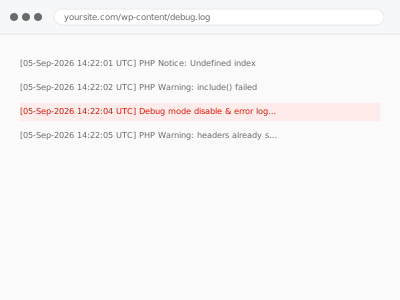
Debug mode left enabled on a live site prints PHP errors, warnings, and notices directly onto the page for any visitor to see, which can expose file paths, database details, or other information that shouldn’t be publicly visible — and it typically gets left on inadvertently after a period of troubleshooting, then forgotten.
Check whether debug mode is actually active right now
Look at your wp-config.php file for WP_DEBUG set to true, or check whether errors and warnings are visibly appearing on your live pages. Either confirms debug mode is active, which is safe to disable immediately since it’s a diagnostic setting, not something your site depends on functionally.
Debug mode disable & error log cleanup
Debug mode left exposing errors publicly, disabled without losing your private error log.
- Full backup taken before we start
- If we can’t fix it, you get your money back
- We never ask for your own password
This or something else?
| Debug mode is enabled on your live site, or you suspect it might be | This fix covers it |
| You want a broader wp-config.php review and hardening, not just disabling debug mode | wp-config.php hardening & cleanup, the more comprehensive version |
| You’re currently troubleshooting an active issue and need debug mode on temporarily | Worth confirming your intent — we’d help disable it correctly once your troubleshooting is done |
| The actual errors debug mode revealed need fixing, not just hiding | We’d address the underlying errors as a separate, related fix once identified |
What you are seeing
- PHP errors, warnings, or notices visibly appearing on live pages
- WP_DEBUG set to true in wp-config.php on a live, public site
- Accumulated debug log files growing large on the server
- The issue possibly dating back to a period of past troubleshooting that was never properly concluded
Common causes
- Debug mode enabled during troubleshooting and never disabled afterward
- A migration or staging-to-live process carrying forward development settings
- A developer or previous provider leaving debug mode on as an oversight
- Confusion between logging errors privately (safe) and displaying them publicly (not safe) in the debug configuration
- A must-use plugin or custom configuration snippet re-enabling public error display independently of the main wp-config.php setting
What we do
- Confirm debug mode’s current state and what’s actually being exposed
- Disable public display of errors while preserving private logging if you want ongoing error visibility for troubleshooting
- Clean up any accumulated debug log files consuming disk space
- Verify no errors display publicly on live pages afterward
- Check whether any exposed information (file paths, credentials) needs further attention beyond just disabling display
- Document the corrected, safe configuration
What is included
- Public error display disabled, with private logging preserved if desired
- Accumulated debug logs cleaned up
- Verified no errors display publicly afterward
- A written note on the corrected configuration
Not included
- Fixing the underlying errors debug mode revealed — a separate, related fix once identified
- Broader wp-config.php hardening beyond the debug setting specifically, a separate, related fix
- Investigating whether exposed information was actually accessed by someone during the exposure window
- Ongoing monitoring for debug mode being re-enabled in future
Questions about this fix
What's actually at risk if debug mode is left on?
File paths, database table structures, or other technical details visible in error messages can give an attacker useful reconnaissance information, beyond the simple unprofessional look of errors appearing on a live page.
Can I still log errors privately without showing them publicly?
Yes, that's the recommended approach — logging errors to a private file for your own or a developer's review, while disabling public display, gives you the diagnostic value without the public exposure.
How would I know if this has been happening for a while?
Accumulated log file size, or simply not having checked recently, are both reasons this can persist unnoticed — since visitors don't typically report this kind of issue, it often goes unnoticed until specifically checked.
Will disabling debug mode fix the underlying errors it was showing?
No, this addresses the exposure itself; the underlying errors still exist and would need their own separate diagnosis and fix if they're not already resolved.
Is it ever appropriate to have debug mode on for a live site?
Generally not for public display — if active troubleshooting requires it temporarily, that should be a deliberate, short-term measure rather than a persistent, forgotten state.
Related fixes
If this is the second time this year
A bad update breaking the site is a symptom of updates not being tested first. Care plans run every update on a staging clone before it reaches your live site, which is the actual fix for this happening again.
Your access, your rules
Create a separate admin account for us and delete it when we are done. For anything else, we get in touch and agree a method — never a form field on this site, never by reply to an email.
We back up first, always
Before anything is touched we take a full backup and keep it for 30 days. If a fix goes wrong, we put the site back exactly as it was.
If it is not what you bought
If the problem turns out smaller than what you ordered, we refund the difference. If it is bigger, we stop and send a quote before doing any extra work.
If we cannot fix it
You get back what we received. Diagnosis is on us — you only pay when the problem is actually solved. The payment processor takes its fee before the money reaches us, so we never hold it and it is not ours to return. That is true here as everywhere else.
If it comes back
Reply within seven days of delivery and we put it back on the bench at no cost. The fix is not finished until it holds.
What we are responsible for
If something goes wrong with a fix, our responsibility is limited to what you paid for it. We take a full backup first so mistakes can be undone, and we tell you before doing anything outside what you bought.