
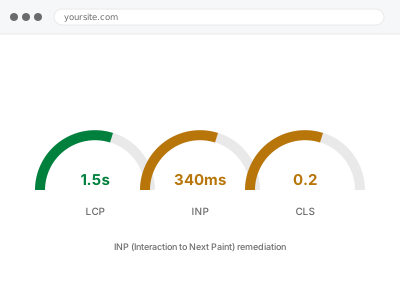
INP measures how long the browser takes to visibly respond after someone clicks, taps, or types — the Core Web Vital that replaced First Input Delay in 2024, and one measured only from real visitors, never a single automated test. A poor score means specific interactions are sluggish, and the cause is almost always JavaScript occupying the main thread at the exact moment someone tries to use the page, not the page being slow overall.
Before you buy, one quick test
As if you were a mobile visitor, tap a filter, open a menu, add something to a cart, or type into a search box, and note which specific interaction feels like it lags before responding.
INP is measured per interaction, not per page, so knowing which action is slow — rather than “the whole site feels slow” — points us straight at the right script instead of a general investigation.
It is worth doing this on the device most of your customers actually use, if you can. A high-end phone or a laptop trackpad can mask a delay that is very noticeable on a mid-range Android phone over mobile data, which is exactly the gap between how a site feels to its owner and how it measures in the field.
INP (Interaction to Next Paint) remediation
Buttons, filters or menus feel laggy to use, and Search Console flags INP. We find the specific script blocking the response and fix that interaction.
- Full backup taken before we start
- If we can’t fix it, you get your money back
- We never ask for your own password
This or something else?
| Specific buttons, menus, or filters feel laggy to tap or click | This fix covers it |
| Typing into a search or form field feels delayed | This fix covers it |
| The page itself is slow to appear, not slow to respond once loaded | Core Web Vitals remediation (LCP & CLS) |
| Site slow generally, no specific interaction identified | Slow site diagnostic report |
| Admin area specifically sluggish | Slow admin dashboard fix |
What you are seeing
- Search Console flagging INP as “needs improvement” or “poor”
- Buttons, dropdowns or filters that feel like they lag before doing anything
- The delay noticeably worse on mobile than on desktop
- It may only happen on specific pages — a filtered shop page, a form, a menu
- The page appears to have loaded fine before the lag is even noticed
Common causes
- A large JavaScript bundle running on the main thread at the exact moment of interaction
- A third-party script — chat widget, analytics, ad script — intercepting and holding the thread
- Event handlers doing more work than needed before the screen actually updates
- A framework or block-editor script re-rendering more of the page than the interaction actually changed
- Multiple scripts competing for the same thread with no prioritisation between them
What we do
- Identify the specific interactions flagged as slow, from field data where it’s available
- Profile what’s running on the main thread at the moment of each interaction
- Identify which script or handler is responsible for the delay
- Break up or defer the blocking work so the interaction responds before the rest finishes
- Re-test the specific interactions identified, not just an overall page score
- Confirm nothing else on the page was affected by the change
What is included
- The specific slow interactions identified and addressed
- Main-thread work reduced at the moment of interaction, not just moved elsewhere
- Before-and-after testing on the actual interactions flagged
- The pre-fix backup, kept for 30 days
Not included
- LCP or CLS work, which is diagnosed and fixed separately
- Rewriting a third-party script we don’t control — we can only change how and when it loads
- Ongoing monitoring of INP over time
- New interactive features
Questions about this fix
What's the difference between INP and the old "First Input Delay"?
FID only measured the very first interaction on a page and only the delay before the browser started responding. INP measures every interaction through the visit and the full time until the screen visibly updates, which is why sites that looked fine under FID sometimes fail INP.
Can a third-party script really be the whole problem?
Yes, and it's one of the most common causes — a chat widget or ad script running its own code on the main thread has no idea your customer is trying to click something else at that exact moment. We can often defer or reprioritise it without removing it.
Will reducing JavaScript break any features?
Not if done correctly — the aim is to defer or reorganise when code runs, not delete functionality. We test the actual interactions afterwards specifically because breaking something silently is the real risk to avoid.
Does INP affect all visitors equally?
No — it's usually worse on lower-powered phones and slower connections, which is part of why it's measured from real visitors rather than a single lab device. A site that feels fine on your laptop can still fail INP for a meaningful share of mobile visitors.
How is this different from general site speed work?
General speed work targets how fast the page appears. INP is about what happens after it appears, when someone tries to use it. A fast-loading page can still have a slow, laggy interaction once it's there.
Related fixes
If this is the second time this year
A bad update breaking the site is a symptom of updates not being tested first. Care plans run every update on a staging clone before it reaches your live site, which is the actual fix for this happening again.
Your access, your rules
Create a separate admin account for us and delete it when we are done. For anything else, we get in touch and agree a method — never a form field on this site, never by reply to an email.
We back up first, always
Before anything is touched we take a full backup and keep it for 30 days. If a fix goes wrong, we put the site back exactly as it was.
If it is not what you bought
If the problem turns out smaller than what you ordered, we refund the difference. If it is bigger, we stop and send a quote before doing any extra work.
If we cannot fix it
You get back what we received. Diagnosis is on us — you only pay when the problem is actually solved. The payment processor takes its fee before the money reaches us, so we never hold it and it is not ours to return. That is true here as everywhere else.
If it comes back
Reply within seven days of delivery and we put it back on the bench at no cost. The fix is not finished until it holds.
What we are responsible for
If something goes wrong with a fix, our responsibility is limited to what you paid for it. We take a full backup first so mistakes can be undone, and we tell you before doing anything outside what you bought.