
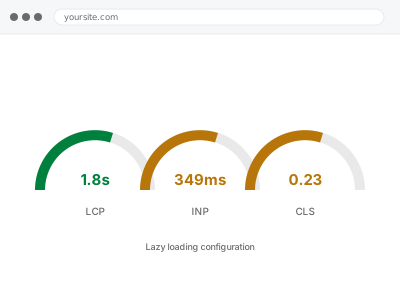
Lazy loading delays offscreen images and iframes until a visitor actually scrolls near them, instead of loading everything the moment the page opens. Done correctly, it meaningfully speeds up the initial load. Done by default settings alone, it sometimes lazy-loads the very image that should have loaded first — the one at the top of the page that defines your LCP score — which makes that specific metric worse, not better.
The one image that should never be lazy-loaded
Whatever image appears largest above the fold on first load is very likely your LCP element, and lazy-loading it delays the exact thing Google measures as your page’s main content appearing.
Most lazy-load plugins apply the same rule to every image by default, including that one, which is the single most common way this backfires and makes a site feel slower to load, not faster.
The fix is narrow and specific: one image, or occasionally a handful across a few templates, excluded by name from an otherwise site-wide setting. It’s a small change with an outsized effect on exactly the metric most people are trying to improve when they add lazy loading in the first place.
Above-the-fold position isn’t always obvious from looking at the design file either — it depends on actual screen size, and what’s above the fold on a wide desktop monitor is often different from what’s above the fold on a phone. We check both, not just one.
Sliders and carousels raise a related but separate question, since only the first visible slide is truly above the fold at load time — the rest are effectively offscreen even though they’re technically part of the same component, and treating them differently is often where a generic plugin setting gets this wrong.
Lazy loading configuration
You want offscreen images and iframes to load only as visitors scroll to them, without accidentally delaying the one image that should load first.
- Full backup taken before we start
- If we can’t fix it, you get your money back
- We never ask for your own password
What we need from you
- Confirmation of which image or element typically appears largest above the fold on key pages
- Whether you already have a lazy-load plugin active, or want a fresh setup
- Any galleries or sliders where lazy loading has caused visible issues before
- Whether iframes — embedded video, maps — should be included
This or something else?
| Setting up lazy loading for the first time | This fix covers it |
| A lazy-load plugin already active but hurting LCP | This fix covers it |
| Images below the fold loading immediately, wastefully | This fix covers it |
| Images not optimised in size or format to begin with | Bulk image optimization & WebP conversion |
| LCP failing for a reason unrelated to lazy loading | Core Web Vitals remediation |
What we do
- Identify the above-the-fold element on each key template that should load immediately
- Exclude that specific element from lazy loading
- Configure lazy loading for everything else — images and iframes below the fold
- Check galleries, sliders and carousels specifically, since they’re the most common place lazy loading breaks visibly
- Test scroll behaviour to confirm images load smoothly ahead of the visitor reaching them
- Re-check LCP after the change to confirm it improved rather than regressed
What is included
- Lazy loading configured with the above-the-fold element correctly excluded
- Galleries and sliders tested specifically for lazy-load issues
- LCP re-checked after the change to confirm a real improvement
- The pre-change backup, kept for 30 days
Not included
- Image optimisation itself, which is a separate fix
- A CDN for image delivery
- Ongoing adjustment as you add new page layouts
- Video hosting or embedding changes
Questions about this fix
Can lazy loading really make my Core Web Vitals worse?
Yes, if it's applied to the wrong image — specifically whatever loads largest above the fold. That's the single most common mistake with default lazy-load settings, and it's exactly what we check for first before touching anything else.
Will visitors see a blank gap while scrolling?
Not if configured correctly — images load slightly ahead of the visitor reaching them, so there's no visible gap under normal scrolling. A gap usually means the loading threshold is set too late, which is a settings fix.
Does this work with my slider or gallery plugin?
Most, but sliders are the most common place lazy loading breaks visibly — an image inside a slide that hasn't been reached yet fails to load even when the slider auto-advances to it. We test this specifically rather than assume it works.
Should iframes like embedded video be lazy-loaded too?
Usually yes, since they're often heavier than an image and rarely need to load immediately. We include them as part of the configuration unless you tell us otherwise.
I already have lazy loading and my site still feels slow. Why?
Lazy loading only affects offscreen content; if the visible, above-the-fold content is what's slow, this isn't the mechanism responsible, and a Core Web Vitals or caching diagnosis would be the more useful next step.
Related fixes
If this is the second time this year
A bad update breaking the site is a symptom of updates not being tested first. Care plans run every update on a staging clone before it reaches your live site, which is the actual fix for this happening again.
Your access, your rules
Create a separate admin account for us and delete it when we are done. For anything else, we get in touch and agree a method — never a form field on this site, never by reply to an email.
We back up first, always
Before anything is touched we take a full backup and keep it for 30 days. If a fix goes wrong, we put the site back exactly as it was.
If it is not what you bought
If the problem turns out smaller than what you ordered, we refund the difference. If it is bigger, we stop and send a quote before doing any extra work.
If we cannot fix it
You get back what we received. Diagnosis is on us — you only pay when the problem is actually solved. The payment processor takes its fee before the money reaches us, so we never hold it and it is not ours to return. That is true here as everywhere else.
If it comes back
Reply within seven days of delivery and we put it back on the bench at no cost. The fix is not finished until it holds.
What we are responsible for
If something goes wrong with a fix, our responsibility is limited to what you paid for it. We take a full backup first so mistakes can be undone, and we tell you before doing anything outside what you bought.